YouVersion Bible App + Audio
- 4.9
- Rating
- 100.00M
- Installs
- Free
- Price

 Analysis by App-foxy
I approached YouVersion Bible as something I might keep on my phone for ordinary moments rather than as an app I would open once, browse briefly, and forget. That distinction matters with a Bible app. A large library can look impressive during the first session, yet lasting value depends on whether it helps me return when I have five quiet minutes, a long commute, or a specific passage in mind. In my experience, this app has a strong chance of becoming a regular tool because it combines reading, listening, verse discovery, study material, and offline access in one place.
It is a free Books & Reference app from Life.Church, rated for Teen users. The current version is 11.14.7+7085925, and it runs on Android 7.0 or later. Those details make it approachable for people using older Android phones as well as newer devices, although the overall experience still depends on how comfortably your phone handles a feature-rich reading app.
Why the first week feels so useful
The first thing I noticed was how quickly the app turns a vague intention into an actual reading session. I do not need to decide in advance which physical edition to carry, search for a separate audio player, or open a browser to find a short devotional thought. The app brings those activities together, which lowers the little bits of friction that usually stop a good habit before it begins.
In-Depth Coverage of YouVersion Bible App + Audio
For a new user, the strongest starting point is the combination of readable Bible text and audio. Reading works well when I want to slow down and compare lines visually; audio is more practical when I am preparing breakfast, walking, or trying to stay away from a screen at night. Switching between those modes gives the app a useful sense of flexibility. It is not just a digital copy of a book, and it is not merely an audio player with text attached.
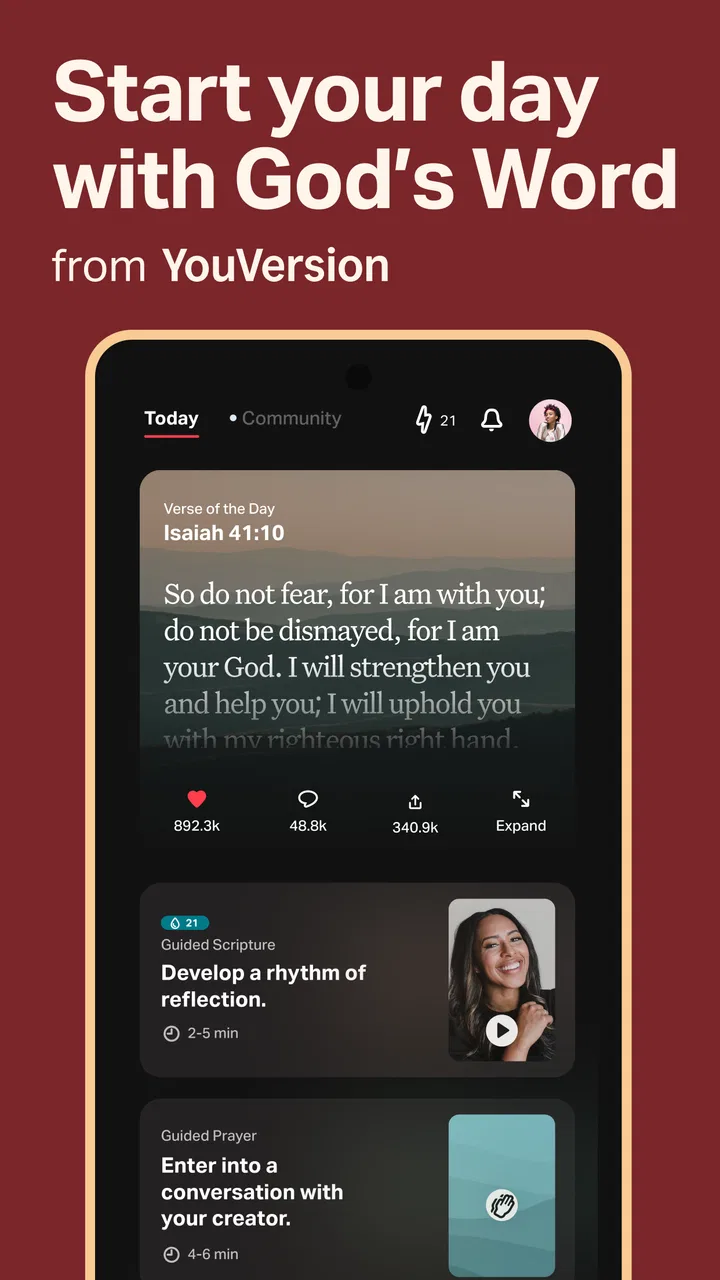
The Verse of the Day feature also gives the first week a natural rhythm. I can open the app without having a complete study plan and still encounter something focused enough to read in a minute or two. That is helpful for beginners who feel overwhelmed by the size of the Bible. At the same time, I would not treat a daily verse as a substitute for reading a full passage. Its strength is as an entry point, not as a complete method of study.
Offline access is another early advantage that is easy to underestimate. Once the relevant material is available on the device, I can read in places where connectivity is unreliable instead of waiting for a page to load. This is especially useful during travel, in buildings with poor reception, or when I want to reduce distractions. The practical tip is to prepare the passages and resources I expect to use before leaving home, rather than assuming every part of the app will be equally convenient without a connection.
The devotional and study content makes the first week feel more guided than a basic e-reader. If I am unsure where to begin, a plan can provide a sequence and a reason to return. That is valuable for someone who wants structure but does not know how to build a reading routine independently. However, I found that the abundance of choices can also create hesitation. Browsing plans is enjoyable at first, but choosing among many possible directions can become a distraction from actually reading.
Finding a personal reading workflow
I get more from the app when I decide what kind of session I am having before opening it. For a quick pause, I use the daily verse or a short devotional. For focused reading, I choose a passage and keep the screen free from unnecessary browsing. For listening, I start the audio before beginning another task. This simple separation prevents the app from becoming a catalogue that I endlessly explore without completing anything.
Search is most useful when I already know what I am looking for. It helps me reach a familiar book, chapter, or phrase faster than turning pages in a physical Bible. It is less satisfying when I am trying to ask a broad theological question and expect a single definitive answer. The app can help me locate text and related material, but it does not replace careful interpretation, a trusted teacher, or a thoughtful conversation with other readers.
I also recommend testing the reading display during the first session. Text size, spacing, and screen brightness affect whether longer reading feels comfortable. A layout that looks fine for a short verse may become tiring after several chapters. The best setup is the one that lets me keep reading without constantly pinching, scrolling, or adjusting the phone.
What remains valuable after the novelty fades
The biggest long-term strength is not any single feature. It is the way the app supports different levels of commitment. On a busy day, I can listen for a while or read a short selection. On a quieter day, I can follow a plan or spend longer comparing passages. That range gives the app recurring value because my routine does not have to be perfect for the app to remain useful.
After the first month, I would judge it less by how many resources I have opened and more by whether it helps me return to the text consistently. The daily verse can serve as a gentle reminder, while plans can provide continuity. Audio adds another route back in when visual reading is inconvenient. These options matter because a habit often fails through scheduling problems rather than lack of interest.
A realistic everyday scenario is a weekday commute. I might read a passage before leaving, then continue with audio while walking or traveling. Later, I can return to the same material when I have time to reflect. The app works well in that pattern because it does not force every session to look the same. A physical Bible may offer a calmer, less distracting experience at home, but it is harder to combine with listening and portable access.
You May Also Like

 Lords Mobile: Kingdom Wars
Lords Mobile Is a Kingdom-Building Routine, Not a Quick Match
A case-by-case verdict on the building, battles, device demands, and social commitments that make Lords Mobile rewarding for some players and exhausting for others.

 PDF Scanner app - TapScanner
TapScanner Makes Paperwork Easier to Capture, Check, and Share
TapScanner makes scanning with a phone feel less like a rescue operation and more like a dependable step in getting work done. Its capture tools are useful, though not flawless.

 Block Blast!
Block Blast! Shows How Much a Puzzle Game Can Leave Out
A quiet grid game shows why puzzle players increasingly value instant clarity, repeatable skill and low-pressure play—and where the genre still needs to catch up.

 Family Space
Family Space Review: A Shared Routine That Makes Family Life Easier
A parenting app earns its place not by adding more noise, but by making everyday coordination easier. Family Space gets that balance mostly right.

 1Weather Forecasts & Radar
1Weather Forecasts & Radar Makes the Daily Check Worthwhile
A good forecast does more than predict rain. This week's pick turns changing conditions into a clear, practical reason to check before you step outside.

 Clash of Clans
Clash of Clans Makes Patience Part of the Strategy
A village builder with a sharp tactical core, Clash of Clans turns patience into momentum and each raid into a small, satisfying act of judgment.
More From Our News Desk
View All News


It is also useful for people who move between communities or traditions and need access to Bible editions and study approaches in one place. Still, that flexibility should be handled thoughtfully. Different translations and devotional resources may use different tones and assumptions. I would not choose a reading plan solely because its title sounds appealing. I would first check whether its pace, language, and perspective fit what I am trying to learn.
The app’s scale is reflected in its reach: it has passed 100 million installs, with an average rating of 4.9 from around 8.6 million ratings. Those figures do not guarantee that every reader will enjoy the interface, but they do suggest that the product has become a familiar daily resource for a very large audience. I see that popularity as evidence of practical usefulness rather than a reason to ignore its limitations.
Where it beats simpler alternatives
Compared with a mobile browser, the dedicated app is more convenient for repeated use. I can return to reading, listening, and devotionals without rebuilding the same search each time. Offline reading is another meaningful advantage over relying on a website. Compared with a plain Bible reader, it offers more ways to create a routine, especially for users who appreciate guided material and audio.
A physical Bible remains better for readers who want to avoid notifications, screen fatigue, and the temptation to switch to another app. A dedicated audiobook or podcast app may also be preferable for someone whose only goal is uninterrupted listening. Likewise, readers seeking academic study tools may want a more specialized resource with stronger scholarly reference features. YouVersion Bible is broad and approachable; it is not automatically the best specialist instrument for every kind of study.
The app is particularly good for households or groups where people have different habits. One person may listen, another may read, and another may follow a devotional sequence. That shared availability can make it easier to discuss a passage later. The trade-off is that a broad audience often means the experience is less tailored than a narrowly focused study application.
The maintenance cost of keeping it useful
The app is free, which removes the financial barrier to trying it and returning to it. The more important cost is attention. Because there are readings, plans, audio, verses, and study materials, I have to decide what deserves my time. Without that decision, the app can encourage collecting plans rather than completing them.
My preferred maintenance routine is deliberately small. I keep one main reading direction, use the daily verse as an optional prompt, and download only the material I expect to need offline. That approach reduces clutter and makes the home experience feel purposeful. Starting several plans at once may feel motivating, but it makes progress harder to understand and can turn a reflective habit into a list of unfinished tasks.
Audio also benefits from a little preparation. I would check the selected passage and start playback before beginning a walk or household chore. That avoids handling the phone repeatedly while moving around. For quiet reading, I prefer to silence other distractions and use the app as a single-purpose screen. The application cannot create concentration by itself; I still have to protect the time around it.
Updates are a normal part of maintaining any app, and the current release shows that this is an actively maintained product. That is reassuring for a tool I might use regularly, but updates can also change the location or appearance of controls. When a familiar button moves, the interruption is minor, yet it can be noticeable for users who want an extremely stable, book-like interface.
What may cause fatigue over time
The first source of fatigue is choice overload. A new user may open the app expecting to read and instead spend several minutes deciding between plans, devotionals, translations, and formats. I think the solution is to treat the extra material as optional support rather than as a requirement. The core habit should remain simple: choose a passage, read or listen, and stop when the session is complete.
The second issue is screen dependence. Even with audio available, many parts of the experience invite visual interaction. Someone who already spends most of the day looking at a phone may find a paper Bible more restful. I would especially recommend the physical option to readers who notice that opening a mobile device immediately leads to unrelated notifications or social media.
Another limitation is that convenience can encourage shallow reading. A verse selected in isolation is easy to consume, but meaning often depends on the surrounding chapter, book, and context. I get better results when I use short features to begin a session and then move into the complete passage. This is one of the most important trade-offs: the app makes access easy, but I still have to bring patience and judgment.
The Teen content rating is worth considering for families. It signals that the app is not presented as a children-only product, so parents should decide whether its reading plans, language, and available material fit a younger user. For teenagers and adults, that rating is unlikely to be a barrier, but it reinforces the idea that the app is a general Bible resource rather than a narrowly designed children’s reader.
Some users may also find the broad devotional ecosystem less useful than a carefully chosen book or local study group. Digital guidance can be convenient, but it does not provide the accountability or personal exchange that comes from discussing a passage with other people. I would use the app as a companion to community and study, not as a replacement for every other form of learning.
Who should make room for it
I would recommend it to someone who wants one free place for Bible reading, audio, daily prompts, offline use, and guided devotionals. It is especially suitable for people building a habit from scratch, readers whose schedules change from day to day, and anyone who wants to move between listening and reading without carrying several resources.
It is also a sensible choice for travelers and commuters. Preparing offline material in advance can make a difference when a connection is weak, while audio allows the habit to continue during tasks that make reading impractical. The app is less compelling for someone who already owns a preferred study Bible, dislikes phone-based reading, or wants an academic reference environment rather than a broad devotional one.
Users with limited storage or very little patience for setup should begin modestly. Download only what is needed, try one reading path, and avoid treating every recommendation as an assignment. That workflow keeps the app lightweight in practice and makes it easier to tell whether it genuinely supports a routine.
Privacy-minded readers may also prefer a physical book simply because it involves fewer digital habits and account-related decisions. The app’s convenience is its main appeal, but convenience always comes with a more connected reading environment. Anyone who finds that distracting should not feel obligated to use every feature just because it is available.
My long-term verdict
After the novelty fades, I think this app earns its place through flexibility rather than constant excitement. The daily verse gives me an easy doorway, full passages provide depth, audio fits busy moments, and offline access keeps the routine practical. Those are recurring benefits, not features I would use once and abandon.
Its weaknesses are mostly the reverse side of its strengths. A large selection can become tiring, mobile access can invite distraction, and short devotional prompts can encourage shallow habits if I never continue into the surrounding text. None of those problems makes the app poor, but they do mean that the best experience comes from setting boundaries and choosing a clear workflow.
Life.Church has built a broad, accessible reference app rather than a specialist tool for one narrow audience. That makes it easy to recommend to friends who want to start reading or listening without paying for a separate resource. I would not replace a trusted physical Bible, a serious study library, or a local community with it, but I would gladly keep it available alongside them.
My lasting recommendation is simple: use it as a dependable doorway, not as a complete substitute for thoughtful study. If you want a free Bible app that can adapt to short pauses, longer sessions, commuting, offline reading, and devotional routines, it deserves a place on your phone. If you want silence, minimal choice, or highly specialized scholarship, another format may serve you better. For everyone in between, its value grows when the habit becomes smaller, steadier, and more intentional than the app’s large menu first suggests.
FAQs for YouVersion Bible App + Audio
01What features does the YouVersion Bible App offer?
The YouVersion Bible App provides a comprehensive suite of features including access to over 2,000 Bible versions in more than 1,300 languages. It offers audio versions for hands-free listening, daily devotionals, reading plans, and the ability to highlight, bookmark, and take notes. Additionally, users can connect with friends for shared reading experiences.
02Is the YouVersion Bible App free to use?
Yes, the YouVersion Bible App is entirely free to download and use. There are no hidden costs or subscriptions required. The app is supported by donations, allowing users to enjoy all features, including Bible versions, audio Bibles, and reading plans without any charges.
03Can I use the YouVersion Bible App offline?
Yes, the app allows users to download specific Bible versions for offline reading. This feature is especially useful when traveling or in areas with limited internet connectivity. However, not all features, such as audio Bibles and daily devotionals, are available offline.
04How does the YouVersion Bible App support community interaction?
The app encourages community interaction by allowing users to connect with friends, share Bible verses, and comment on each other's activities. It also offers the ability to create and join community reading plans, providing a sense of fellowship and shared learning among users.
05What devices are compatible with the YouVersion Bible App?
The YouVersion Bible App is compatible with both Android and iOS devices, including smartphones and tablets. It is also available on the web, allowing for seamless transition between devices. The app supports synchronization across platforms, ensuring your notes and progress are always up-to-date.
Pros
- Extensive library of Bible translations.
- Offline access to downloaded versions.
- Audio feature for hands-free reading.
- Daily devotionals and reading plans.
- User-friendly interface and navigation.
Cons
- Requires account for full features.
- Notifications can become overwhelming.
- Some translations need internet.
- Limited customization of themes.
- Occasional audio playback issues.

YouVersion Bible App + Audio
Gallery